Posts

Showing posts with the label ASP.NET MVC

MEF Framework

Image
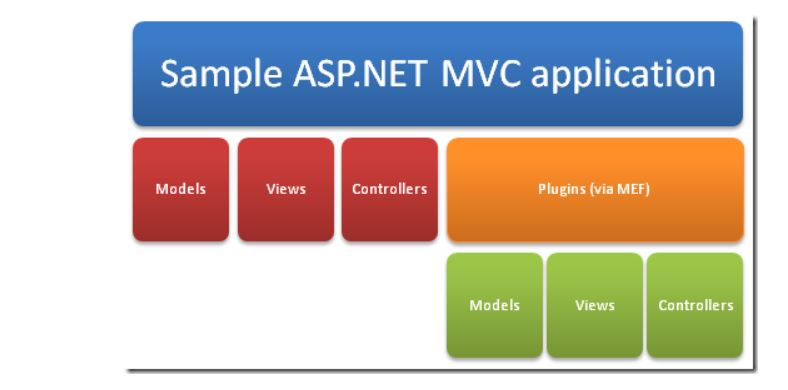
This article provides an overview of the Managed Extensibility Framework that was introduced in the .NET Framework 4 What is MEF? The Managed Extensibility Framework is a library for creating lightweight, and extensible applications.  It allows application developers to discover and use extensions with no configuration required.  It also lets extension developers easily encapsulate code and avoid fragile hard dependencies.  MEF not only allows extensions to be reused within applications, but across applications as well. The problem of extensibility? Imagine that you are the architect of a large application that must provide support for extensibility. Your application has to include a potentially large number of smaller components, and is responsible for creating and running them The simplest approach to the problem is to include the components as source code in your application, and call them directly from your code. This has a number of obvious drawbacks. Most importantl...

Customized path change for MVC Views

When we create MVC project all the Models, View and Controllers will be created with separate folder structure. after publishing the MVC you will get folder structure as  BIN Views Images Fonts Styles Scripts Global.asax Packages.config web.config so, we will place all the folders and files into a folder called WebSite1 and map that folder to IIS virtual directory and use it. But if we want to keep another sub folder within the WebSite1 then we have to make changes to the default  return view(). Required folder structure WebSite1 WebUIFileUpload                   BIN Views Images Fonts Styles Scripts Global.asax Packages.config web.config   we can change the default paths using below process public class CustomViewEngine : WebFormViewEngine {     public CustomViewEngine()     {         var viewLocations =  new[] {   ...

MVC Project publish Steps

Generally after we create asp.net project we used to deploy the site at IIS by creating virtual directory my mapping physical path code. But MVC project  has different process to publish at IIS we have to follow below steps to create deploy folder MVC Project Publish Steps 1 . Select Project at Solution Explorer and right click on it 2 . Select Publish 3 . Select Profile and Click Next button 4 . Specify the Profile Name as it is temporary to create 5 . Click on Next button 6 . Select the Publish Method from the drop down as "Web Deploy Package" and Click Next button 7 . Specify the Package Location path so that it will place the package in zip 8 . Click on Next button 9 . Specify Site name if you want otherwise leave it as it is not mandatory field and then Click Next button 10. Select the configuration as Release from the drop down 11. Click on Next button 12. See the preview 13. Click On Publish It will publish the entire project and place the deployme...

Exception handling in ASP.NET MVC

Exception handling is the process of handle the occurrence of exceptional conditions requiring special processing and displaying the customized messages or logs. Exception handling is important in any application. In ASP.NET we can handle exceptions in the following two ways: Try-catch-finally block at method level Using Application_Error In ASP.NET MVC we have a larger list of ways to handle exception such as: Simple way Override “OnException” method Using “HandleError” Attribute Inheriting from “HandleErrorAttribute” Handling HTTP errors Global Error handling in MVC Simple way The simplest wayis to use the traditional .NET exception handling style i.e. try and catch block. Now when exception happens catch block gets executed and it redirects to the error view. But if we use this method then we will not be utilizing MVC exception mechanism properly and completely. In the further sections we will discuss five important ways by which we can utilize MVC provided ...

Merging ASP.NET Web Forms into ASP.NET MVC

Image
we have asp.net web forms web site and asp.net MVC web site, and wanted to merge both into single web site so that we will be having single app pool at IIS. most of the articles saying, the best way is to rewrite the asp.net web forms into asp.net mvc and then achieve the above requirement. But,  there is often no business case for this when the application is well established and has grew over time to be quite a monster. Below are then steps i just did Once setup, I copied the sub-folders and files from the corresponding top-level folder in  Windows Explorer  and pasted them into the solution. If you do it the way, the project allows you to copy in sub-folders and content directly, adding existing item via visual studio only copies in files thus saving time. Please note: for the root folder, I did  NOT  copy in  web.config  or  Global.asax , but copied in all other files (like default.aspx, etc) Once all content was copied, I open...